Flow with it.
One system, every component.
The classic skin: Inter typography, ink-black 2px borders and the periwinkle
accent, expressed as CSS custom properties in
design-system.css.
The resume and the blog are both built from these parts.
Specimen
One card, re-inked and re-shaped by whatever the two columns say.
Set — Classic / Periwinkle
Article blocks
Prose, quotes & callouts
Everything below renders from Markdown on blog posts. Blockquotes take the 4px ink
bar from the original single-post page; callouts are authored as
:::note / :::tip / :::warning containers.
Body copy with a hyperlink, some bold emphasis, inline var x = 42; code, a Ctrl + K shortcut and a highlight.
The details are not the details. They make the design.
Charles Eames
Notes carry supporting context the reader can safely skip.
Tips are shortcuts: the thing you wish you had known first.
Warnings flag the failure modes that only show up in production.
- Square accent markers on unordered lists
- Comfortable 8px spacing between items
| Token | Value | Source |
|---|---|---|
| --ds-accent | #7371FC | .text-magenta |
| --ds-border | 2px solid ink | .salv-blog-wrap |
| --ds-radius-md | 10px | .nav-tag-item |
Article blocks
Code blocks
Fenced code gets a framed block on the #141414 canvas: language label, one-click
copy, and a brand-tuned syntax theme (Prism). C#, PowerShell, YAML, Bash, SQL,
JSON, TypeScript and Razor ship by default.
public sealed record DesignToken(string Name, string Value)
{
    // Tokens are immutable; the system changes by versioning, not mutation.
    public static DesignToken Accent { get; } = new("--ds-accent", "#7371FC");

    public override string ToString() => $"{Name}: {Value};";
}
$tokens = Get-Content './design-system.css' |
Select-String -Pattern '--ds-[\w-]+(?=:)' -AllMatches |
ForEach-Object { $_.Matches.Value } |
Sort-Object -Unique
Write-Output "The design system defines $($tokens.Count) tokens."
Article blocks
Diagrams
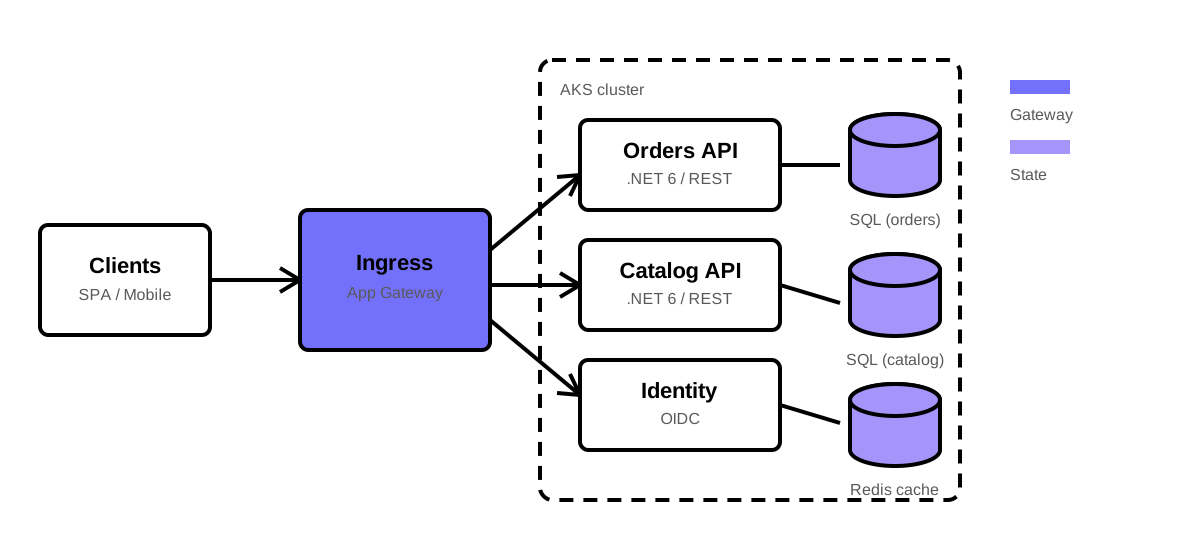
A fenced ```mermaid block in Markdown renders to an SVG diagram on a
framed, centered panel, themed to the active palette (tidal blue and golden dune
under Flow; periwinkle on the classic skin). The library loads lazily and only on pages that
contain a diagram; if it ever fails to load, the raw source stays readable.
Flowcharts, sequence, pie, xychart, block and radar diagrams are supported.
flowchart LR
    A[Write Markdown] --> B{mermaid fence?}
    B -- yes --> C[Render SVG]
    B -- no --> D[Framed code block]
    C --> E[Themed diagram]
pie showData title Discipline weights
"Specification" : 35
"Context" : 25
"Harness" : 20
"Verification" : 20
Article blocks
Markdown extras
The full Markdig pipeline is wired up. GitHub-style alerts (> [!NOTE]),
LaTeX math ($x$ inline, $$…$$ block, rendered with KaTeX),
footnotes, definition lists, strike/insert/sub/sup, abbreviations and citations all
render to the system style. Emoji shortcodes (:rocket: → 🚀) and
smart typography (straight quotes become curly, -- an en dash) are on too.
Note
GitHub alert syntax maps to the same look as the :::note callouts.
Important
The important variant uses the periwinkle accent.
Caution
Caution maps to the danger token.
Inline math like \(E = mc^2\) sits in the text, while block math is centered on its own line:
A footnote reference1
links down to the list at the foot of the article. Inline runs support
struck text, inserted text, H2O, x2,
an HTML abbreviation and a
cited source.
- Greenfield
- A new system built without the constraints of prior work.
- Brownfield
- Work that must integrate with an existing, live codebase.
-
Footnotes render smaller, with a top rule and a back-link. ↩
Article blocks
Media blocks
Figures take an uppercase caption with the small accent line. Plain YouTube or
MP4 links in Markdown become responsive 16:9 embeds automatically. Image pairs
can opt into a two-column gallery.