Give Old Rows Their Own Table
JSON payloads can migrate lazily because the reader controls the shape - relational rows cannot, because the table is the shape. VersionKit's EF Core answer is table-per-version - archive Orders as Orders_v2 on a schema bump, track every row's home in a registry, and let old rows stay old until something moves them. Part 7 of the Entity Versioning with VersionKit series.
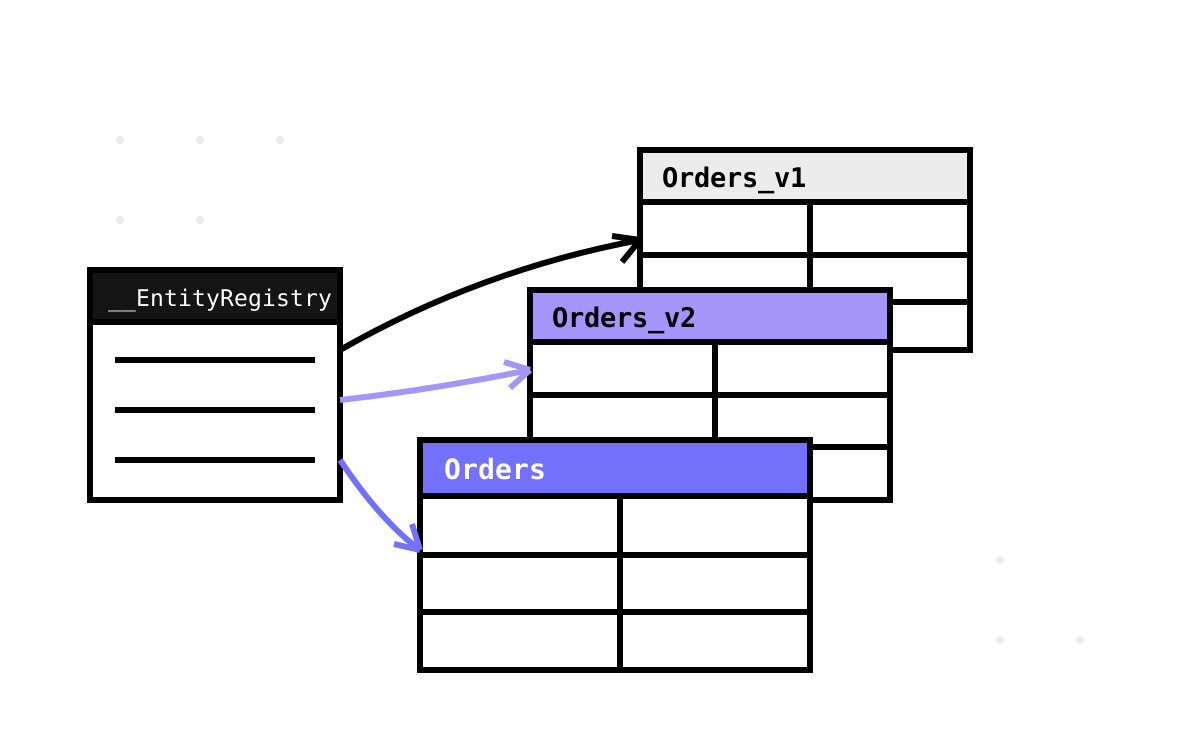
The first half of this series had a luxury it never acknowledged: JSON does not have a schema the storage enforces. A v1 payload and a v3 payload sit happily in the same text column, and the reader sorts them out. Rows are different. A relational table has exactly one shape, so when ClientId becomes CustomerId, the usual choices are a locking ALTER TABLE + UPDATE over every historic row on deploy night, or an ever-growing pile of nullable columns kept for old data's sake.
VersionKit.EntityFramework takes a third route, and it is the most opinionated design in the library: when the schema bumps, the current table is archived wholesale — Orders becomes Orders_v2 — and a fresh Orders is created at the new shape. Old rows keep their old schema, in their own table, untouched. New rows land in the new table. And a small registry knows, for every entity, which table it currently lives in. This part builds that foundation; Parts 8 and 9 make it read, write, and drain.
Two system tables
Everything rests on two tables the library configures for you when your DbContext opts in:
protected override void OnModelCreating(ModelBuilder modelBuilder)
{
    modelBuilder.ApplyVersionKitConventions();
}
__EntityRegistry answers “where does this row live?” — one row per versioned entity instance:
public sealed class EntityRegistryEntry
{
    public Guid Id { get; set; }              // the entity's own id
    public string EntityType { get; set; }    // "Order"
    public string CurrentTable { get; set; }  // "Orders" or "Orders_v2"
    public int SchemaVersion { get; set; }    // the version of that table
    public DateTime CreatedAtUtc { get; set; }
}
The registry is also the answer to the question that kills most table-splitting schemes: foreign keys. If OrderLines pointed at Orders, archiving Orders to Orders_v2 would orphan every FK. So related tables reference __EntityRegistry.Id instead — the registry row is the entity's permanent address, and which physical table the data occupies right now is the registry's private business. The row's Id is the entity's Id; the indirection costs one indexed join and buys tables that can be renamed underneath the graph. There is an index on (EntityType, SchemaVersion) for the “how much v2 data is left?” queries that operations teams inevitably ask.
__VersionKitSchemaHistory answers “which archive tables exist, and are they finished?” — one row per (entity, archived version):
public sealed class SchemaVersionEntry
{
    public string EntityTypeName { get; set; }   // "Orders"
    public int SchemaVersion { get; set; }       // 2
    public string ArchiveTableName { get; set; } // "Orders_v2"
    public bool FullyDrained { get; set; }
    public DateTime CreatedAtUtc { get; set; }
    public DateTime? DrainedAtUtc { get; set; }
}
FullyDrained is the lifecycle bit: it starts false when a table is archived and flips true when the EF backfill (Part 9) has moved every row forward. A drained archive table is droppable — the history row, with its DrainedAtUtc timestamp, remains as the audit that it existed.
What the conventions do to your model
ApplyVersionKitConventions does more than register those two tables. It walks every entity carrying [SchemaVersion] and applies the property attributes from Part 2 to the relational model:
// Properties removed before or at current version: ignore
if (merged.RemovedInVersion > 0 && merged.RemovedInVersion <= currentVersion)
{
    modelBuilder.Entity(clrType).Ignore(prop.Name);
    continue;
}

// Set SQL default value for properties added after v1
if (merged.DefaultValue is not null && merged.AddedIn > 1)
{
    modelBuilder.Entity(clrType).Property(prop.Name)
        .HasDefaultValue(merged.DefaultValue);
}
This is the moment the two halves of the library click together. Remember Part 2's oddity — the removed LegacyNotes property stays on the class as pure metadata? Here is the payoff: the convention reads RemovedInVersion = 3, sees the entity is at v3, and un-maps the property, so the current Orders table simply has no LegacyNotes column while the JSON pipeline still knows how to strip it from old payloads. One declaration, two enforcement points.
Likewise the literal defaults: Status with DefaultValue = "Pending" becomes a genuine SQL default. The sample's generated migration shows the result — Status = table.Column<string>(nullable: false, defaultValue: "Pending") — which means even rows inserted around the edges of your application code get the declared default. Computed defaults (DefaultProvider) have no SQL representation and stay a read-path concern.
One piece of honesty about the implementation: the repo contains a proper EF Core IModelFinalizingConvention (PropertyVersionConvention) that does this same work plus richer annotations — VersionKit:RenamedFrom and friends, for future migration tooling to read. It is not wired in. EF Core conventions must be registered before the model builds, which fights the “one extension method in OnModelCreating” ergonomics, so ApplyVersionKitConventions applies the logic directly and the convention class waits on the bench. The comment in the source says as much. I mention it because half-finished seams like this are exactly what you should look for when evaluating any library — including mine.
The archive-and-create pattern
Now the centrepiece. When you bump Order from v2 to v3 with column-level changes, you write an ordinary EF Core migration — but before the auto-generated CreateTable, you call one helper:
protected override void Up(MigrationBuilder migrationBuilder)
{
    // 1. archive the old world
    VersionKitMigrationHelper.ArchiveCurrentTable(migrationBuilder, "Orders", fromVersion: 2);

    // 2. EF Core's scaffolded CreateTable for the new Orders shape runs here

    // 3. regenerate the cross-version view (Part 8)
    VersionKitMigrationHelper.CreateOrUpdateUnionView(migrationBuilder, typeof(Order), 3);
}
ArchiveCurrentTable is four steps, and each one earns its place:
var archiveName = $"{tableName}_v{fromVersion}";

// 1. Rename current table to archive
migrationBuilder.RenameTable(name: tableName, newName: archiveName);

// 2. Insert tracking row in __VersionKitSchemaHistory
migrationBuilder.Sql($"""
    INSERT INTO "__VersionKitSchemaHistory"
        ("EntityTypeName", "SchemaVersion", "ArchiveTableName", "FullyDrained", "CreatedAtUtc")
    VALUES ('{tableName}', {fromVersion}, '{archiveName}', false, NOW());
    """);

// 3. Update registry — rows now live in archive table
migrationBuilder.Sql($"""
    UPDATE "__EntityRegistry"
    SET "CurrentTable" = '{archiveName}'
    WHERE "CurrentTable" = '{tableName}';
    """);

// 4. Add optimistic concurrency column for backfill safety
migrationBuilder.Sql($"""
    ALTER TABLE "{archiveName}"
    ADD COLUMN "_backfill_modified_at" timestamptz NOT NULL DEFAULT NOW();
    """);
Step 1 is the whole trick: RenameTable is a metadata operation — milliseconds, no data movement, regardless of row count. A hundred-million-row Orders archives as fast as an empty one. That is the deploy-night difference between this pattern and the classic ALTER + backfill-in-migration: the migration transaction holds a schema lock for an eyeblink, and all data movement is deferred to background draining. Step 2 tells the drain worker a new archive exists. Step 3 is a single bulk UPDATE repointing every registered row at its new address — the registry's one-address-per-row model means archiving is one statement, not one per row. Step 4 quietly plants the _backfill_modified_at timestamp column that Part 9's optimistic concurrency dance will depend on; adding it at archive time means the column exists before any drain or write-through ever races.
The SQL is PostgreSQL — NOW(), timestamptz, and later ON CONFLICT and NULL::type casts. That is not an accident of laziness so much as a scoping decision: the EF package currently targets the database I run in production, and the dialect surface (a handful of helpers) is small enough to port when someone needs SQL Server. Interpolating table names into SQL would normally be a red flag; here every name comes from the type system and a version integer, never user input — the same reasoning behind the #pragma warning disable EF1002 you will find in the repository layer.
The impatient alternative: bulk copy
Table-per-version defers data movement, but sometimes you want the movement now — a small table, a maintenance window, no appetite for a drain period. For that, VersionKitSql builds the classic copy-forward:
var sql = VersionKitSql.BulkCopyFromArchive("Orders_v2", "Orders",
    new Dictionary<string, string>
    {
        ["Id"]          = "\"Id\"",
        ["CustomerId"]  = "\"ClientId\"",                                  // rename
        ["Status"]      = "'Pending'",                                     // default
        ["IsExpedited"] = "(\"IsExpedited\" IN ('true','1','yes'))::boolean", // cast
    });
The mapping dictionary is destination-column → source-expression, which is what makes renames, defaults, and type conversions expressible as one INSERT INTO … SELECT. The generated statement ends with ON CONFLICT ("Id") DO NOTHING, so re-running a partially-completed copy is safe — the same idempotency reflex as everywhere else in the library. Its sibling SetDefaultForExistingRows covers the milder case where you altered in place and just need NULLs filled.
Notice what the bulk-copy mapping is, though: the same knowledge as the property attributes — rename, default, type change — hand-transcribed into SQL expressions. For the declarative change kinds that duplication grates, and it is on the list to generate these mappings from VersionTableSchema (which already computes per-version column maps, as Part 8 will show). For now, bulk copy is the manual gear.
The structure is in place: old rows in their own tables, a registry that knows every row's address, history that tracks what needs draining. What we have not done is read anything — and a point lookup that might live in any of three tables, or a query that should span all of them, is where this design either pays off or falls over.
Next: One Query Across Every Version — the version-aware reader and writer, and the generated UNION view.